Offers & checkout
In Cursare, authored content and the thing you sell are two different objects. Content is the deliverable — its recursive document and learning experience. An offer is a sellable package of that root content: it owns price, currency, installments, listing, seat limits, approval, intake, and delivery format.
Every monetary value is stored and transmitted in the currency's smallest unit (cents). A price of 9990 in BRL means R$99.90.
What the buyer confirms before paying
Every paid offer requires a complete legal seller profile. The storefront identifies the responsible school, address, consumer-support channel, and the seller tax id only where it is a public contract fact. US EIN is never shown, while individual SSN/ITIN verification stays entirely with Stripe. Before leaving for hosted checkout, the buyer reviews the course, offer, total price, exact installment schedule, access duration, and the offer's 7, 15, 21, or 30-day withdrawal window, then explicitly confirms the purchase. Those facts are frozen in the receipt and Account → Purchases & refunds; later offer edits do not rewrite an accepted contract.
The offer model
- Content starts without an offer. Creating content only creates its document and route. Add an offer explicitly when it should accept free enrollment, approval requests, or payment.
- The final active offer may be archived. This stops new entry without changing the content, graph, existing enrollments, purchases, or archived offer history.
- Exactly one active offer is primary when active offers exist. The offer's own
isPrimarymarker is the sole source; content has no second pointer. The first active offer becomes primary, and another can be selected later. - Content can carry many offers. "Standard", "Early bird", "August cohort" — each with its own price and terms. Every option grants access to the same root graph.
Enrollment
Selling terms are managed inside the course through Enrollment:
- One enrollment option — the workspace summarizes the learner path and groups controls under Entry, Price, Delivery, and Rules. Most courses never need to learn the internal word "offer".
- Two or more enrollment options — the workspace becomes Ways to enroll. Each row shows the primary marker, price, entry, delivery, visibility, and capacity. Selecting one opens the same editor, with make primary, duplicate, share, and archive actions in context.
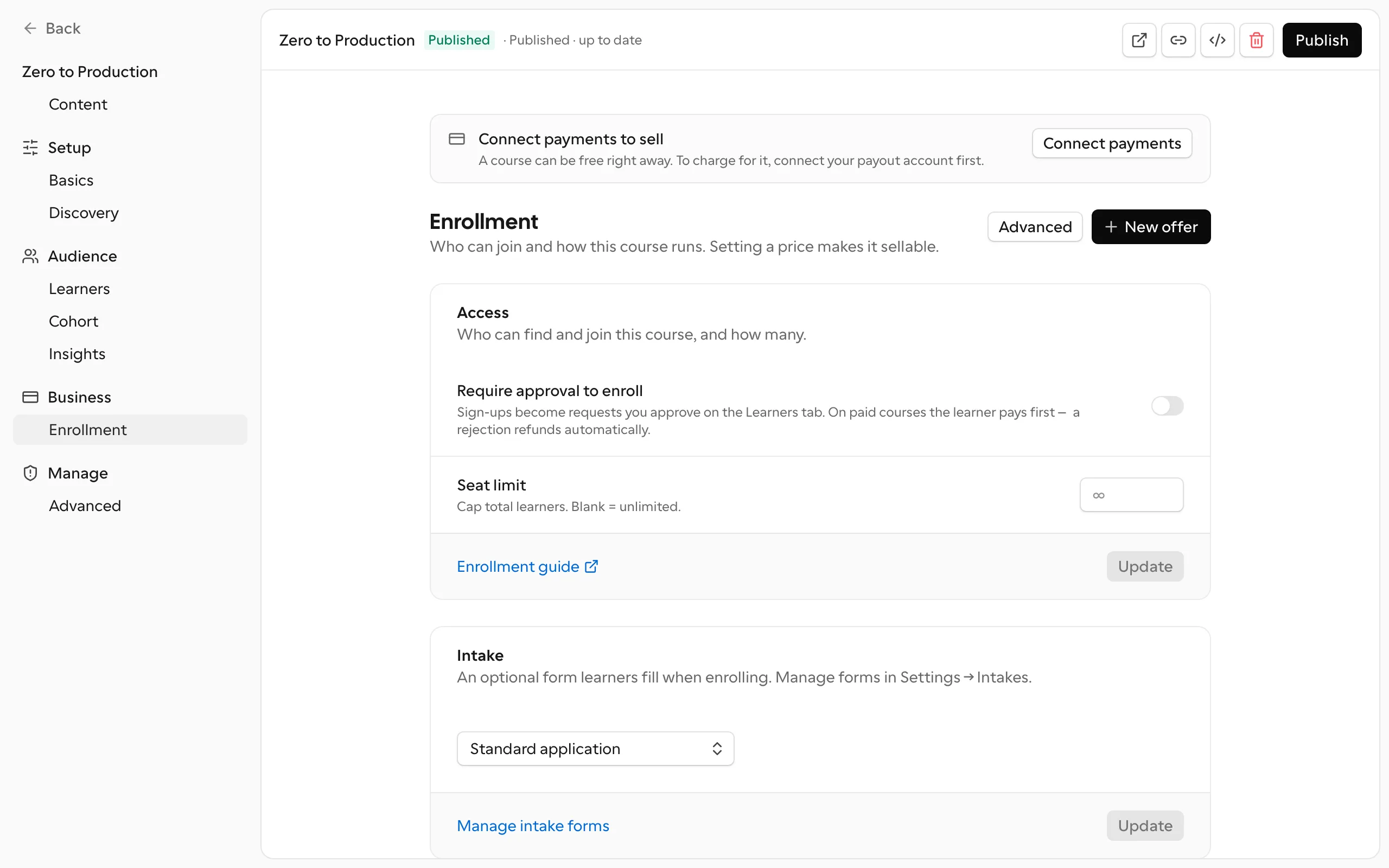
The selected enrollment option uses the same four sections in either mode:
| Section | What lives there |
|---|---|
| Entry | Public, verified domain, private link, or either credential |
| Price | Free or paid, currency, installments, and catalog listing |
| Delivery | Self-paced or cohort, discussion, cohort defaults, and tutor policy |
| Rules | Approval, intake, access duration, and capacity |
Offers are archived, not deleted — past sales and enrollments keep pointing at them. Archiving a primary offer selects another active offer when one exists; archiving the final active offer clears the primary and stops new entry.
The deliveryMode is also part of the offer's historical identity. It can switch between self-paced and cohort only while no purchase, request, enrollment, or cohort points at the offer. After its first use — including a purchase later refunded or canceled — the field is locked; duplicate the offer and edit the copy to sell another format.
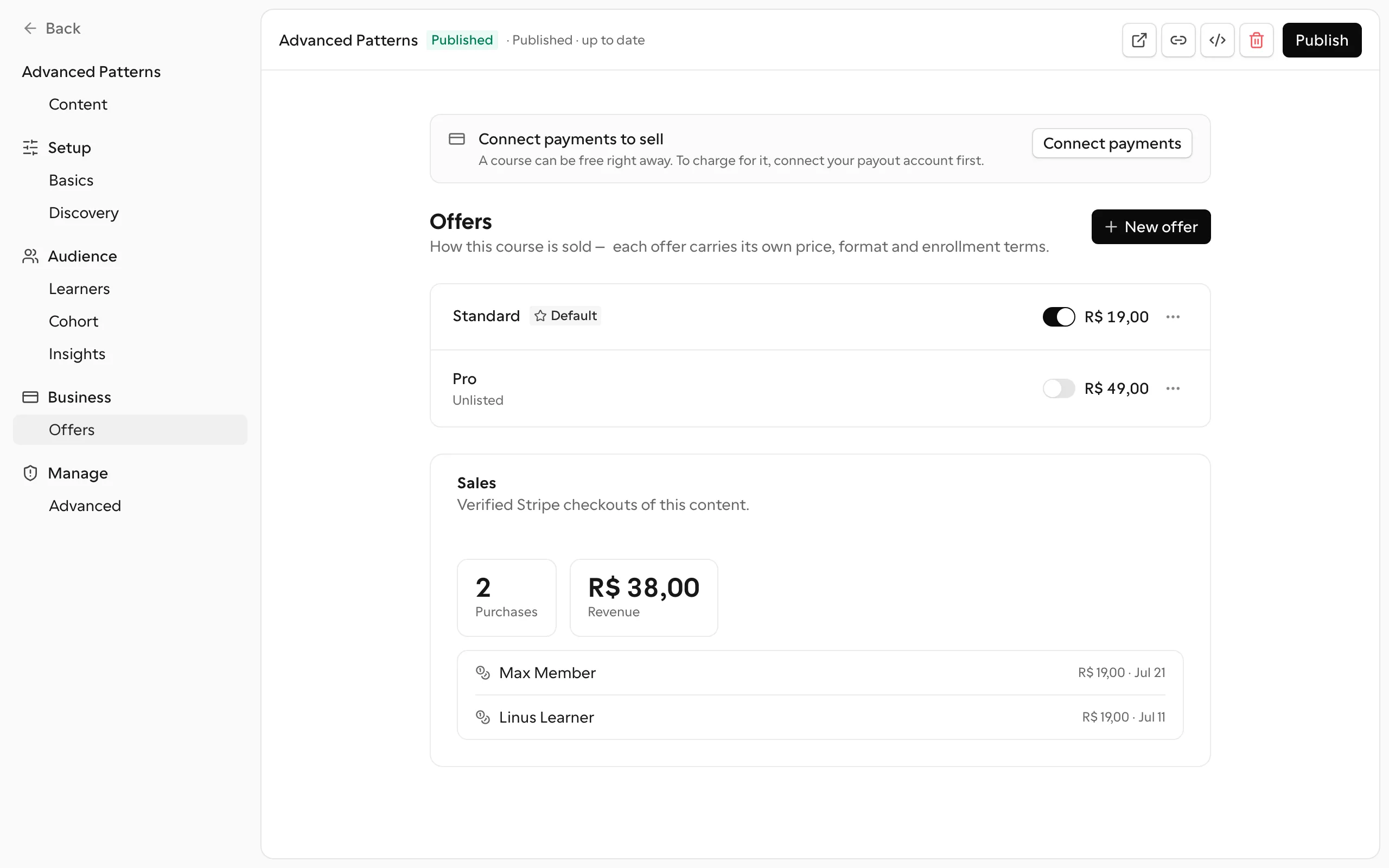
Two invariants hold across a course's active offers:
- One currency per course. Revenue is summed per course; mixing currencies would corrupt every total. The currency also freezes once an offer has sales.
- Free and paid may coexist — with eyes open. Access is per-course, so every offer leads to the same course enrollment. A free offer removes the payment step but still creates an active learner before the course body opens; a paid offer alongside it sells its terms (a dated cohort, a tutor, a dedicated cohort), not a different body of content. The storefront labels each door with its price so learners choose knowingly.
Setting a price
Price is set on the offer's Pricing section, in the currency's smallest unit. A null or zero price means free. The normalization rules are:
- The price must be finite and between
0and the configured ceiling (it rejectsNaN/Infinityand column overflow). - The currency must be in ISO-4217 form: exactly three letters, for example
BRL,USD. An empty or arbitrary string is refused. - A positive price is rounded;
0or null storesnull(free). - A positive price must be at least R$10.00 (
1000in minor units) — anything below that floor should simply be free.
Currency can't change after the first sale
An offer's currency can be changed freely as long as it has no sales. From the first purchase on, the currency is frozen.
The lock is enforced under the same per-course lock the purchase record uses, so no sale can confirm itself in the window between the check and the write.
What the learner sees
The course's public page — {organization}.cursare.com/{slug} — is the one canonical Cursare URL, whatever the number of offers behind it:
- One purchasable offer — the plain enroll/buy bar, priced by that offer.
- Two or more purchasable offers — an offer picker above the bar: each option shows its name, price, and cohort hint; the bar below always sells exactly the selected offer, with its own installments, seats, approval, and intake form.
- Free primary offer — a direct enroll button; the course appears in the catalog when Listed is enabled.
- Catalog — a course with multiple purchasable offers advertises its cheapest one: "From R$15.00".
A direct link can preselect an offer with ?offer=<id> — the anchor for campaign and affiliate links pointing at a specific package. Each row in the selected enrollment option carries View public page, Copy offer link, and QR code actions that generate this link for you.
The buyer checkout flow
A priced offer creates a durable purchaseRequest and starts checkout in the organization's active payment integration, charging the offer's price already adjusted for any coupon.
Before starting the provider checkout, the server resolves one state per buyer and course:
| State | Result |
|---|---|
available | A checkout session may be created. |
enrolled | Access already exists: return to the course and never buy another offer. |
pending_approval | Keep the current request; do not open another checkout. |
past_due | Show plan recovery; do not offer a second purchase. |
purchased | A confirmed payment is waiting for fulfillment; finish enrollment without charging again. |
This decision runs inside the server action, including direct or manipulated calls; hiding the button is only the visual representation of the same rule.
- The buyer starts checkout from the course's public page (having picked an offer, when there's a choice). Cursare creates the
purchaseRequestand redirects them to the connected provider. - Cursare accepts payment proof only from the provider — Stripe is re-verified server-side, while an external checkout confirms through an HMAC-signed webhook. The browser return alone is never trusted.
- The purchase is written as a
purchaserow carrying the offer it was sold under, the learner is enrolled and bound to that exact purchase (respecting the offer's seat limit and the cohort chosen at checkout), the coupon redemption is counted, and the enrollment email is sent. Only the resulting active learner unlocks reading.
If enrollment can't be completed after a successful payment — for example a cohort that filled up during checkout — Cursare starts the provider's refund flow and marks the purchase refunded after confirmation. Stripe supports the automatic path; a generic external integration must complete the refund in its own system and send the signed event. See Payments & payouts.
Campaigns
Campaigns are discount codes for paid offers, managed on the standalone Campaigns dashboard. A campaign is scoped to a set of one or more paid offers, or to the whole organization (global — every paid offer). The discount computes off the selected offer's own price and applies only to offers in the set; the code is unique per organization and always normalized to uppercase.
A campaign is public or private. A public campaign advertises itself on the storefront — the course page shows a “was / now” (de/por) price with an optional wide banner image and a disclaimer (fine print), and the discount is applied automatically at checkout (the buyer never types the code). A private campaign only applies when the buyer enters the code. When more than one public campaign covers an offer, the one that discounts the most wins.
| Field | Rule |
|---|---|
code | 3 to 24 characters, letters, numbers, and hyphens only; stored uppercase; unique within the organization |
percentOff | Whole number from 1 to 100 |
amountOff | Positive value in cents, up to 100,000,000 |
| Percentage or amount | Exactly one of the two must be set — never both, never neither |
maxRedemptions | Optional; integer of at least 1, up to 10,000,000; null = unlimited |
- Charge floor. The discounted price can never drop below
50(smallest unit), the platform's checkout floor. A coupon that would take the price below this floor is refused at checkout. - Calculation. Percentage:
round(price × (100 − percentOff) / 100). Fixed amount:price − amountOff. - Who manages them. Creating, pausing/resuming (
setActive), and deleting require the organization's owner/admin — campaigns are an org-wide marketing surface, so the teamfinancerole does not grant them. Quoting (quote) and redeeming are public at checkout. - Deleting a coupon does not undo past sales — purchases already made remain.
Seat limits
An offer can cap how many learners it accepts with a seat limit. When the cap is reached, checkout and enrollment stop letting new learners in — the seat check runs when a purchase is finalized and when an approval turns a request into an active learner.
Only active learners occupy a seat. A learner who is refunded or delinquent keeps their row and history but frees the seat, so the limit tracks real, current access rather than the raw number of rows.
Unlisted but sellable
Whether an offer appears publicly is separate from whether it can be sold. An offer can be unlisted — hidden from the catalog and from the course page's picker — yet still fully purchasable through its direct ?offer=<id> link.
The Listed toggle is available for every public offer. A free offer starts unlisted, but the school may list it in the storefront; restricted offers remain unlisted because catalog visibility is public discovery, not an access rule.
This is the pattern for a private cohort, an early-access price, or a package you share only with a specific audience: turn off the Listed toggle in the offer's Enrollment section and hand out the link. See Publishing & access for how listing and access levels combine.
Pay-first enrollment approval
When a paid offer requires approval, the buyer pays first and lands in the request queue — the money doesn't buy access directly.
- The buyer completes checkout; the return creates the enrollment request through the
paidpath, which skips the intake form because the payment is its form. - The team approves — the buyer becomes a learner, respecting the offer's seat limit and the cohort chosen at checkout — or rejects.
- A rejection refunds the buyer's purchase automatically: the request carries the exact
purchaseId, so rejection never guesses among historical sales for the same user and course.
The 30-day rule
| Request type | Deadline | At expiry |
|---|---|---|
| Paid offer + approval | 30 calendar days from request creation | Approval is blocked and the payment enters automatic refund processing |
| Free offer + approval | No automatic deadline | It keeps waiting for the team's decision |
The 30 days are measured from the exact createdAt instant, not through the end of day 30. At createdAt + 30 days, the team can no longer approve the request. Because the Vercel job runs once a day, the refund starts on the first daily run after expiry, not necessarily at the exact second the deadline is reached.
For a free offer with approval, the learner requests access themselves and the intake form is required. The coupon redemption is still counted on the pending-approval path, as long as the purchase was actually recorded. How approvals, cohorts, and the request queue behave is detailed in Learners & enrollments.
Guardian-paid learning
An assured guardian can choose an active linked child as the learning beneficiary on an eligible offer and must explicitly approve that exact course and offer before continuing. The guardian remains the buyer for checkout, receipts, refunds, installments, tax, affiliate attribution, and payment authority. The child is the learner for enrollment, access, progress, educational notices, and certificates. Duplicate checks and fulfillment follow the beneficiary; a refund still follows the buyer-owned purchase.